
Tactical callsigns
Having the ability to retreive messages using an alternate (Tactical) callsign when your station is unavailable.
With AX25 Packet radio you can not have 2 packets station with the same callsign,
This will cause it to malfunction and cause Frammer Errors
Winlink Express & Tactical Callsigns
CREATING :
Open "Setup"
Under "Auxiliary Callsigns and Tactical Addressess" Click on "Add Entry"
Enter your tactical callsign eg. CRD-Fisgard and a password
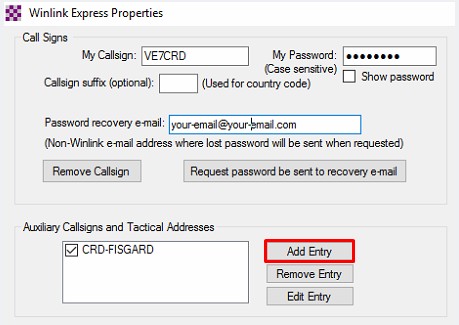
Note: Tactical Callsigns are 3 to 12 total characters ALL CAPITALS, alpha only - alpha and numbers. eg. CRD-FISGARD. When the event is over you can delete the tactical callsign. Using a password will create an online Winlink account just like registering your real call-sign. an email address of tactical callsign will be created (your tactical Callsign)@winlink.org.
eg. CRD-FISGARD@winlink.org
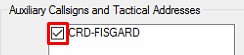
TACTICAL CALLSIGN - ON/OFF
Activate - put a check in the box of the tactical callsign you want to activate
Deactivate - remove the check in the box of the tactical callsign you want deactivate
SENDING:
Open a new message window and use the drop-down box "From:" (then pick the tactical callsign's you setup and wish to use) and enter your message as normal, then post it via P2P or WL2K as required
Note: When someone uses your tactical address in their "To:" field
(the callsign will automatically be changed to uppercase)
eg. To: CRD-FISGARD;
RECEIVING:
Connect to you Local hubbing Post office or HF Pactor to a RMS Trimode station
Open a Winlink session and connect to retrieve your messages or email's to your Tactical Callsign.
Note: If multiple people are using your tactical callsign you must co-ordinate who is collecting the messages.